
↵Open
Acme Deals Limited changelog
Spot out-of-date credit reports and get the latest one
Feature
Notifications
Handshaik now tells you when a credit report you hold is out of date: it marks the report, lets you buy the latest one, compares versions, sends a daily notification, and adds a Library filter.
See when a credit report is out of date
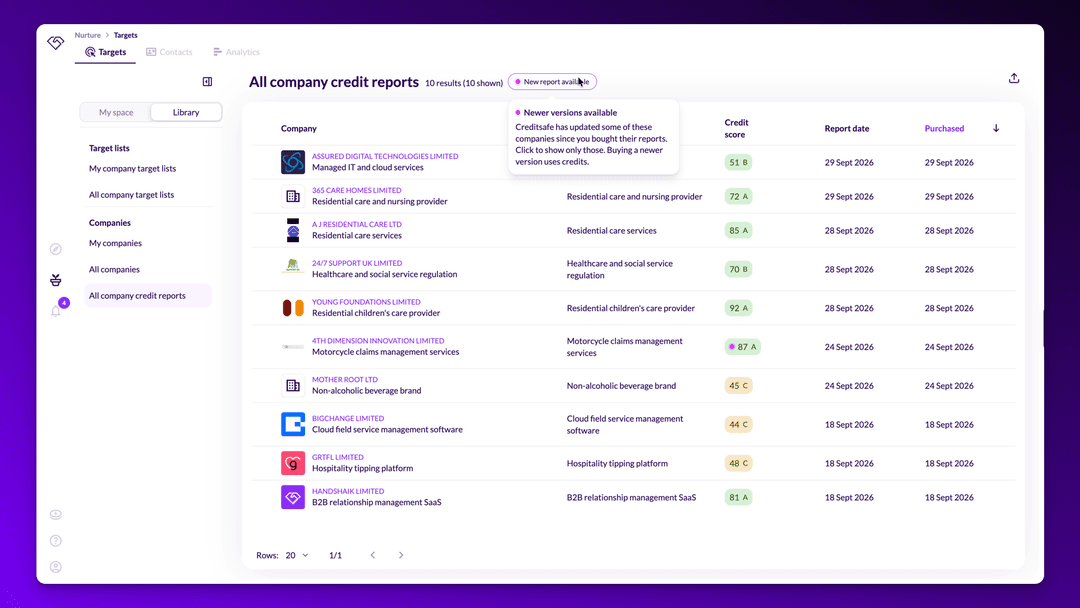
A credit report is a snapshot. The day after you buy it, the company can file new accounts, change directors, or get a new rating. Until now, nothing told you a newer report existed.
Now we watch every company you hold a report for. When Creditsafe records a change after your report was produced, that report is marked wherever it appears:
Company page: a New report available label next to the credit report heading on the Financials tab, and on the credit score tile on the Overview tab
Target lists and Library: a dot on the credit score, with a tooltip explaining it
This covers every report you hold, including ones you bought before this feature existed.
Buy the latest report when you need it
Once you owned a report, there was no way to buy the latest one. Now you can choose Get the latest report on the Financials tab, or Get latest next to the score in a target list.
It's a new purchase, at the same price as any credit report, and you confirm it before you're charged. We never buy a newer report for you. Once the new report arrives, the marker clears.
Compare versions and see what changed
A version picker next to the credit report heading replaces the version list. It opens on the latest version and lists every version you hold, newest first, with how the score moved. Once you hold three or more versions, it also shows a small chart of the score over time.
Pick a version and the score, the report, and a new What changed since summary all follow it. The summary covers score, rating, credit limit, and company status. If you're looking at an older version, a notice tells you when the latest one is from.
Get one daily notification of out-of-date reports
Once a day, you'll get one notification listing the reports that have gone out of date since the last one. You won't be told about the same report twice.
One report: it names the company and opens its Financials tab
Several: it gives the count and opens your Library, filtered to those reports
It appears in the notifications panel only, with no pop-up. It's on by default. Turn it off in Account → Notifications under Credit reports.
Filter your Library to reports with a newer version
Library → Companies → All company credit reports has a new New reports available filter. Switch it on to see only the reports that have a newer version, alongside your other filters.